Access control in DynamoDB#
DynamoDB does not come with its own account management & fine-grained access control. Instead, it integrates with IAM, just like other AWS services.
This is great when your users authenticate with IAM, but it’s not the case of the majority of serverless web applications that authenticate users via OAuth.
Serverless web applications on AWS are usually structured this way: API Gateway receives a request, proxies this request to a Lambda, that constructs the response, optionally querying DynamoDB. In this architecture, the Lambda runs with a static IAM role. OAuth authentication is performed in the Lambda runtime using this static role; i.e. no fine-grained IAM access control.
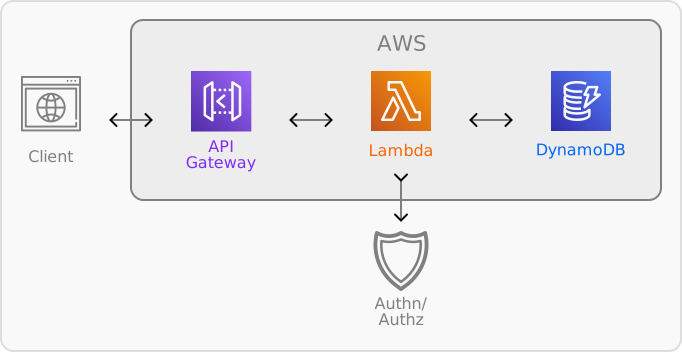
This approach is usually preferred because it is simple, responsive, and yet scales. It leaves the responsibility of access control to the Lambda’s runtime, however1.
If you’re writing a SaaS application in particular, you need to make sure that your tenants are isolated.
Fortunately, by following 3 rules, DynamoDB can provide tenant-based access control.
All partition keys have tenant#
Make the tenant identifier a constituent of all your items’ partition key (a.k.a. hash key). For a String partition key, with a single-table design, the value of the partition key be:
${tenant}#${entity_kind}#${item_partition_key}No SCAN#
All other CRUD operations are allowed, however you shall not use scan. Scanning in DynamoDB reads any of your partitions at random. Thus, it bypasses the first rule. Enforce this in your Lambda role permission: deny dynamodb:Scan.
Get tenant from the request only#
The final piece: the tenant identifier is always provided by the request. It shall not be a value you can retrieve from a query in the same table. If you do need to provide a list of tenants somewhere, this should be done separately, in a different table or preferably in a different cell.
How does it work?#
All CRUD operations in DynamoDB require a partition key. All except scan which is why we disable it in rule 2.
Rule 3 ensures that a client’s access to a tenant partition is handled separately; the tenant identifier acts as a message passed between this step and the current requests; isolating each request to a single tenant. As a corollary, you should treat any request that require access to multiple tenant with higher restrictions, ideally running on a separate Lambda with the least privileges.
Finally, rule 1 leverages rule 2 and 3 to ensure that your CRUD operations can only retrieve information from that tenant’s partition, since it becomes impossible to access other tenants’ data without their identifiers.
Limitations#
While this works well to isolate requests to a single tenant, this remains a “coarse-grained” approach; you do not have access to the attribute based access control provided by IAM and will need to implement the equivalent permissions in your application.
API Gateway’s Lambda authorizers allow you to provide context variables that can be used in dynamic fine-grained access control roles. This approach is more complex and not common for Next.js applications, in particular. ↩︎